
How Do You Choose a Safe Rideshare App?

Last Updated: October 29, 2026
Quick Summary
A safe rideshare app verifies drivers before pickup, lets you share your live trip, and gives you a way to get urgent help. Look for driver identity checks showing name, photo and licence plate, PIN verification before the ride starts, and clear fare estimates shown before you confirm. Choose an app that matches your needs, such as supervised rides for teens or support for passengers with disabilities.
- Check the driver's name, photo and licence plate before pickup.
- Use PIN verification so the driver confirms a code before the ride starts.
- Share your live trip details with a trusted contact.
- Cancel the ride and report it if the car or driver does not match the app.
Table of Contents
- Checking Rideshare App Safety Features Before You Book
- How to Verify a Rideshare Driver and Vehicle Before Getting In
- Choosing a Safe Rideshare App for Teens and Passengers with Disabilities
- Frequently Asked Questions
Checking Rideshare App Safety Features Before You Book
Choosing a safe rideshare app starts before you request a ride. For extra safety, consider a women-only option such as LEFKO Pink rides across Australia.
Look for these features in any rideshare app you consider:
- Driver identity checks: name, photo and licence plate before pickup.
- Live trip sharing: share your trip with a trusted contact.
- PIN verification: driver confirms a code before the ride starts.
- In-app emergency help: a clear button or number for urgent support.
- Clear fare estimates: price shown before you confirm.
LEFKO Rideshare includes PIN verification and live trip sharing. LEFKO Rider lets you book a ride, follow your driver in the app and find your receipt in My trips. You can also work out a LEFKO fare before you book.
The article lists five features to look for in any rideshare app.
| Feature | What it does | Why it matters |
|---|---|---|
| Driver identity checks | Shows name, photo and licence plate | Confirms the right driver before pickup |
| Live trip sharing | Shares your trip with a trusted contact | Lets someone follow your journey |
| PIN verification | Driver confirms a code before the ride starts | Verifies the driver before the trip begins |
| In-app emergency help | A clear button or number for urgent support | Gives fast access to help |
| Clear fare estimates | Price shown before you confirm | Avoids surprise costs |
How to Verify a Rideshare Driver and Vehicle Before Getting In
Before you get in, check that the car and driver match the app.
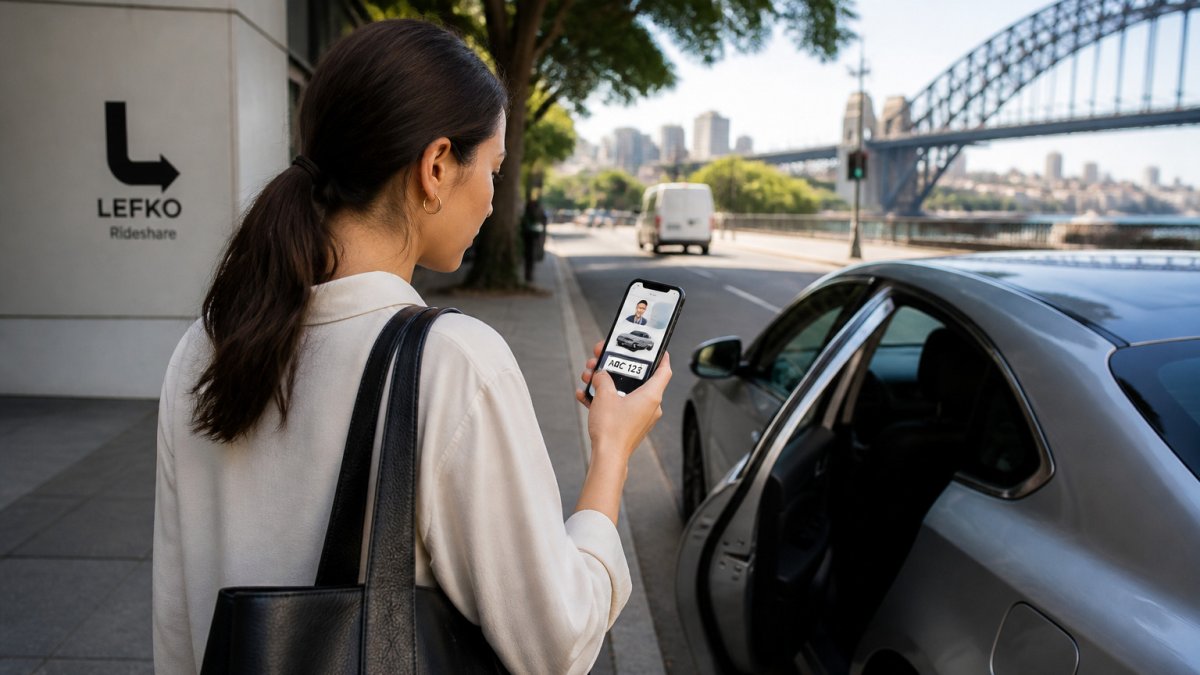
Follow these steps each time:
- Check the driver's name and photo in the app.
- Match the licence plate on the car with the app.
- Confirm the vehicle make and model.
- Ask the driver to say your name before you get in.
- Share your trip details with a trusted contact.
Never get in a car that does not match the app details. If anything looks wrong, cancel the ride and report it.
Choosing a Safe Rideshare App for Teens and Passengers with Disabilities
Teens and passengers with disabilities may need extra support, so pick an app that offers the options you need. For teens, look for supervised rides with checked drivers: LEFKO Teen rides are available across Australia for riders aged 13 to 17, with a parent-managed account, cleared drivers and GST-inclusive fare estimates. For passengers with disabilities, check that the app lets you explain your needs before you book and share your live trip with someone you trust.
Compare apps on these points before you choose:
- Driver checks and how they are shown in the app
- Live trip sharing and emergency help
- Fare estimates that include GST
- Customer support hours
Frequently Asked Questions
Is it safe to use Uber in Australia?
Rideshare services in Australia generally work well, but safety depends on how you use them. Check the driver's photo, name and licence plate against the app before getting in, confirm the vehicle model, and share your trip with a trusted contact. Use in-app emergency tools if something feels wrong. Comparing safety features across apps, including trip sharing and PIN verification, helps you judge which service suits your needs.
How can I verify that my rideshare driver and vehicle are correct?
Before you get in, compare the driver's name and photo with what appears in the app, and check that the licence plate and vehicle make and model match the booking details. If anything differs, do not get in. Ask the driver to confirm your name before you share the trip. Verifying these details takes under a minute and is the simplest protection a passenger can use on every trip.
What should I look for in a rideshare app if I am booking for a teenager?
Look for apps with a supervised teen option, live trip sharing so a parent can follow the journey, and PIN verification that confirms the driver before pickup. Check that the app lets you share trip details with a trusted contact and that support is easy to reach if something goes wrong. Teaching your teen to confirm the driver and vehicle before getting in reinforces these protections.
